I am having a similar issue mentioned below. I downloaded the RapidLPC.exe and clicked Open Spritesheets Folder, selected the folder but none of the images show up only the names.
I will try this one, however it's the same size as the one I got from the link below and the 'Download Demo'. I have tried selecting both the main spritesheets folder and the one inside it next to __MACOSX. I can see the PNG files in the folders and they look fine.
I also noticed the hierarchy in the spritesheets folders seems different from the .exe. If I go into heads in the spritesheets folder I see arms, backpack, etc.. but the first level in heads in the exe. is Alien, Boarman, etc.. I don't know how the program runs so it may be intended to work this way but I thought I would call it out.
Hello! Just picked up the generator today but I'm having the issue EvergreenTV reported with the gray screen. The top levels for each tab show an image but once I get inside of those it's just empty squares. I'm on Windows.
Hi Dolos, Thank you for trying out this tool, Can you confirm you've followed the steps above to download the assets?
Step 1: Download and Unzip assets.zip Step 2: Open RapidLPC Step 3: Click Open Spritesheets Folder Step 4: Select spritesheets folder
If yes, would you mind take a screenshoot of the issue? Also provide your environments, e.g OS version, what folder path did you unzip the tool ? Thank you !
Hello. Yes, I followed those steps. I even tried it on two different computers but the issue remains. All tabs are the same but I will elaborate on the pictures. The top level of the head tab shows images:
But when I click into one of them all of the images in the subfolder are blank:
If I manually go into the subfolders of the directory, all the spritesheets have images on them:
Thank you so much for the detailed information — it helped me locate the problem quickly!
Since the structure of the assets folder has changed, we now need to use a specific version of the assets. If you could download the file below, everything should work properly:
I was about to buy this saw that comment was like uh-oh then saw your reply and just wanted to say thanks for not only a quick response time to the original commenter but for fixing the issue quickly. Ill be purchasing in the morning.
← Return to tool
Comments
Log in with itch.io to leave a comment.
I am having a similar issue mentioned below. I downloaded the RapidLPC.exe and clicked Open Spritesheets Folder, selected the folder but none of the images show up only the names.
hi ,
Have you tried to download this assets?
assets.zip
Thanks!
I will try this one, however it's the same size as the one I got from the link below and the 'Download Demo'. I have tried selecting both the main spritesheets folder and the one inside it next to __MACOSX. I can see the PNG files in the folders and they look fine.
I am also using the RapidLPC.ex
Yes, they should be same, but worth to give it a try.
Same issue. Should it say (DEBUG) in the title?
I also noticed the hierarchy in the spritesheets folders seems different from the .exe. If I go into heads in the spritesheets folder I see arms, backpack, etc.. but the first level in heads in the exe. is Alien, Boarman, etc.. I don't know how the program runs so it may be intended to work this way but I thought I would call it out.
Still having issues. Is there an email I can contact you with to take this concern off this forum?
What are those characters in the title art? Thry arent lpc.
Hello! Just picked up the generator today but I'm having the issue EvergreenTV reported with the gray screen. The top levels for each tab show an image but once I get inside of those it's just empty squares. I'm on Windows.
Hi Dolos,
Thank you for trying out this tool,
Can you confirm you've followed the steps above to download the assets?
Step 1: Download and Unzip assets.zip
Step 2: Open RapidLPC
Step 3: Click Open Spritesheets Folder
Step 4: Select spritesheets folder
If yes, would you mind take a screenshoot of the issue?
Also provide your environments, e.g OS version, what folder path did you unzip the tool ?
Thank you !
Hello. Yes, I followed those steps. I even tried it on two different computers but the issue remains. All tabs are the same but I will elaborate on the pictures. The top level of the head tab shows images: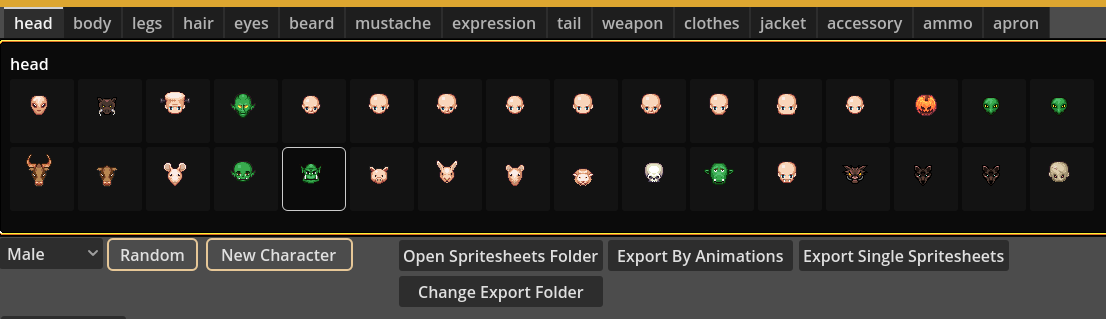
But when I click into one of them all of the images in the subfolder are blank: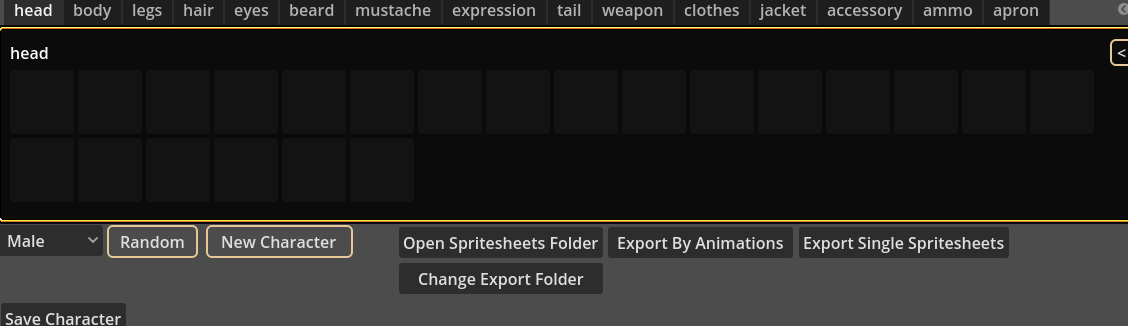
If I manually go into the subfolders of the directory, all the spritesheets have images on them:
The directory is a folder on my desktop:
Here are my system specs:
Windows 11, 25H2
AMD Ryzen 7 7700X, 32GB-5600, GeForce RTX 4080
Hi Dolos,
Thank you so much for the detailed information — it helped me locate the problem quickly!
Since the structure of the assets folder has changed, we now need to use a specific version of the assets. If you could download the file below, everything should work properly:
assets.zip
I’ve also updated the relevant description.
Thank you!
I tried the link but it says the token has expired. Thanks for the fast responses!
Hi Dolos,
Sorry didn’t know it link not work as well, could you try to look for download demo section, I think you should be able to see it there.
P.S Could try this assets.zip
It won't display any character pieces when I select the spritesheets folder, just a gray screen.
I found out it has bugs on windows, and just updated the newer version and fixed those bugs.
Thank you for letting me know,
I was about to buy this saw that comment was like uh-oh then saw your reply and just wanted to say thanks for not only a quick response time to the original commenter but for fixing the issue quickly. Ill be purchasing in the morning.
Thank you for your support! That's my greatest motivation to keep developing better tools for people.